Learn · The scheduling behind it
The data date: the day your schedule is speaking from
After this subject you can say what a data date is in plain words, read the one your project is measured as of, and know what changes the day it moves.
A schedule that knows what day it is
A look-ahead with no date on it is a picture of a plan. Nothing on the page says which morning the plan it shows was true of, so a fresh print and a month-old one look exactly the same. A schedule in Brikt carries that date with it, and everything it tells you is stated as of that day.
Why it matters — an undated page is not wrong. It simply cannot tell you how old its view of the plan is.
Before it is history; after it is still the plan
Think of a bank balance. It is a real number, and it is a number as of a moment — spend something after it and the figure is not wrong, it is just older than you are. A schedule works the same way. Progress is recorded through this date. Anything before it is history; anything after it is still the plan.
Why it matters — once a start or a finish is recorded as having happened, its date has a name: an actual start, or an actual finish. That is a record of what happened rather than a forecast of what will.
Three names for the same day
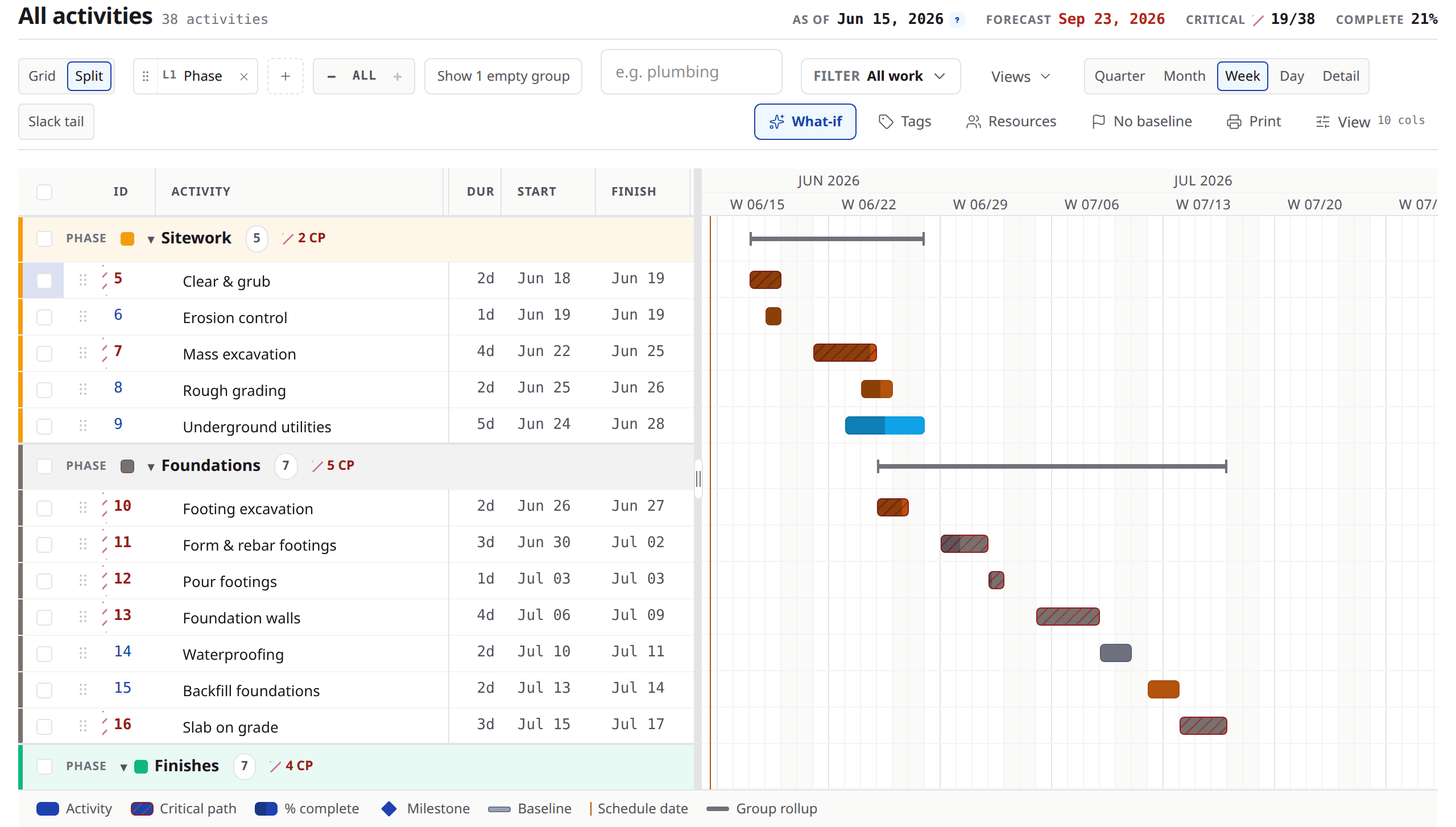
Brikt's own chrome keeps it plain: the schedule header reads As of and the day it is measuring from, and the Gantt draws a line down that same day. Schedulers call it the data date, or the status date, and printed sheets keep that name. All three are one day.
Look at
- 1The As of readout in the header — the day this schedule is speaking from.
- 2The line down the Gantt on the same day.
- 3The forecast finish beside it, which is what the plan says from there.
Why the check-in asks about that date, not about today
The morning list is what the schedule expected, not what the calendar on the wall says. The two agree for as long as the date is kept current. When it is not, the header says so — it names the day it is measuring from, and how many days behind that is.
Why it matters — it is why a row can read “due to start today” on a morning that is not today.
What moves when it advances
Moving the date forward tells Brikt that everything planned before it should have started. Three things follow. Work that should have started and did not gets asked about. Work still running is re-counted from the new line. Work already finished stops being a question.
Why it matters — the days left on a running activity are re-counted from the new date, so its expected finish does not slide out just because the date moved.
Work that should have started and did not
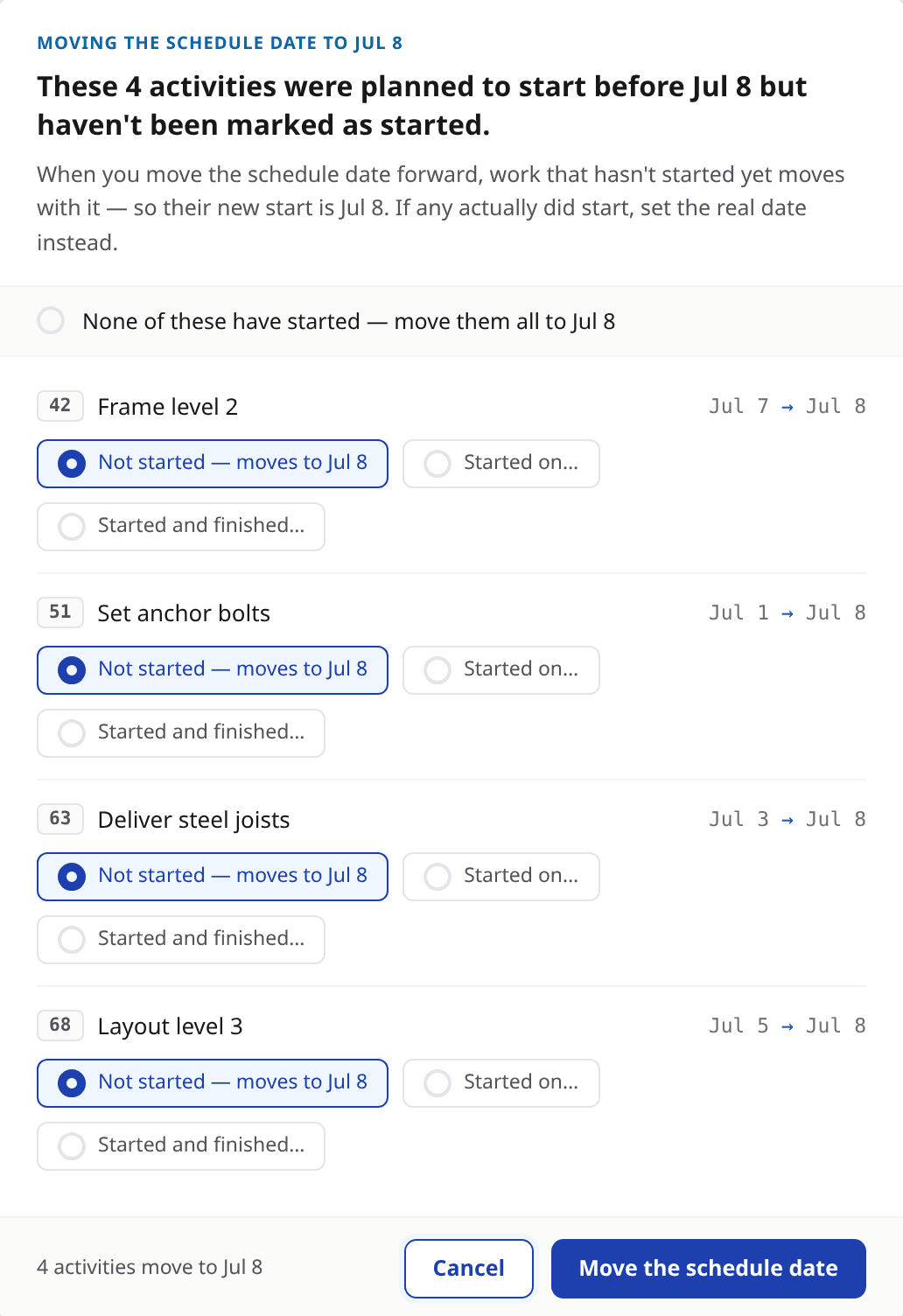
Brikt does not quietly push those rows into the future. It asks. Moving the date names every one of them, with the day it moves from and the day it moves to, and offers three answers on each: started, with the real date; started and finished; or not started, which moves it to the new date and is the answer every row opens on. The move is proposed, not performed — nothing is written until you press the confirm.
Look at
- 1Every affected row named, with the date it moves from and to.
- 2The three answers each row offers, opening on “not started — moves to”.
- 3The count of what will move, stated beside the confirm.
Why it matters — the schedule never tidies itself out of sight. Every row it intends to move is named first, and a row that really did start is recorded as started rather than pushed.
A finish before the line is a choice, not an assumption
Enter a finish date that has already passed and Brikt will not read it as work with days left on it. Nor does it decide for you: it says what the date reads as, and offers the two honest answers — record it as started and finished, or pick a finish on or after the date if it is still going.
Why it matters — only you finish an activity; Brikt never assumes it.
Days, not hours
In Brikt, durations are whole working days, and 1w means five duration days. A day is a day whatever the calendar's hours are, and nothing starts or finishes in the middle of one. So a running activity re-counted onto a new date lands on a whole day, and the smallest honest answer is one day left.
Why it matters — zero days left would mean finished, and finishing is something you say rather than something a count decides. The whole-day count and the five-day week are both Brikt's conventions rather than facts about scheduling: other tools track durations in hours, and on a calendar that works six days a working week is six working days — Brikt just does not let you type that as 1w.
Who moves it, and when
Reporting progress never moves the date. Someone moves it deliberately, and only forward — a project admin or editor, from the schedule header or from the check-in. Inside an update cycle the date sits behind today quite legitimately; that is the cycle working, not a fault.
Ask about the date, not about the mood
Ask
What date is this schedule measured as of?
Instead of
Is this schedule current?
Ask
What was due to start before that date and has not?
Instead of
What is late?
Ask
When are we bringing the date forward?
Instead of
When is the next update?
What to remember
- A schedule states its facts as of a date. Before it is history; after it is still the plan.
- Brikt's header reads As of; schedulers call the same day the data date, or the status date.
- The check-in asks what the schedule expected as of that date, not what today is.
- Advancing it asks about work that should have started, re-counts what is still running, and leaves finished work alone.
- Durations are whole working days, and the smallest honest answer on a running activity is one day left.
Find the date your schedule is speaking from
Open a project you are running and read the As of date in the schedule header. If it is behind today, the header says how far — and the check-in is where you bring it forward. If you would rather see a whole update cycle on a real job first, bring one to a demo and we will run a morning on it together.
Carry on
Lesson 10 of 12