Learn · The scheduling behind it
The critical path: the work that decides your finish date
After this subject you can read which chain is driving your finish date, tell a driving relationship from one with slack in it, and know what Brikt marks for you and what it leaves open.
Your finish date is a result
Nobody types the project finish into Brikt. You say what the work is, how long each piece takes, and what has to happen before what. From that the schedule works out the dates you have not pinned, and the last one is the finish date. Change one duration and everything downstream of it is worked out again.
Why it matters — a date somebody typed is a date nobody has to justify. A computed one has a reason behind it you can follow.
The work that decides it
On most schedules some work decides the finish date and some has room to move. If one of these slips, your finish date slips. The rest have some slack — days they can move before they start to matter. Which rows qualify is a question the scheduling world answers in more than one way, and this page does not settle it.
Why it matters — the critical path is the chain of work the project finish is hanging on. That is the shortest honest answer to “what is actually holding the finish date”. That a slip moves the finish assumes nothing else changes: mitigation, re-sequencing or shortening the work that follows can absorb a slip before it reaches the finish date.
It is drawn where you are already looking
You do not ask for it. Open the schedule and the driving relationships are accented on the chart, so a chain reads at a glance rather than after a hunt. The grid also carries a Critical column, and the filter menu a Critical chip that narrows the view to the rows it marks.
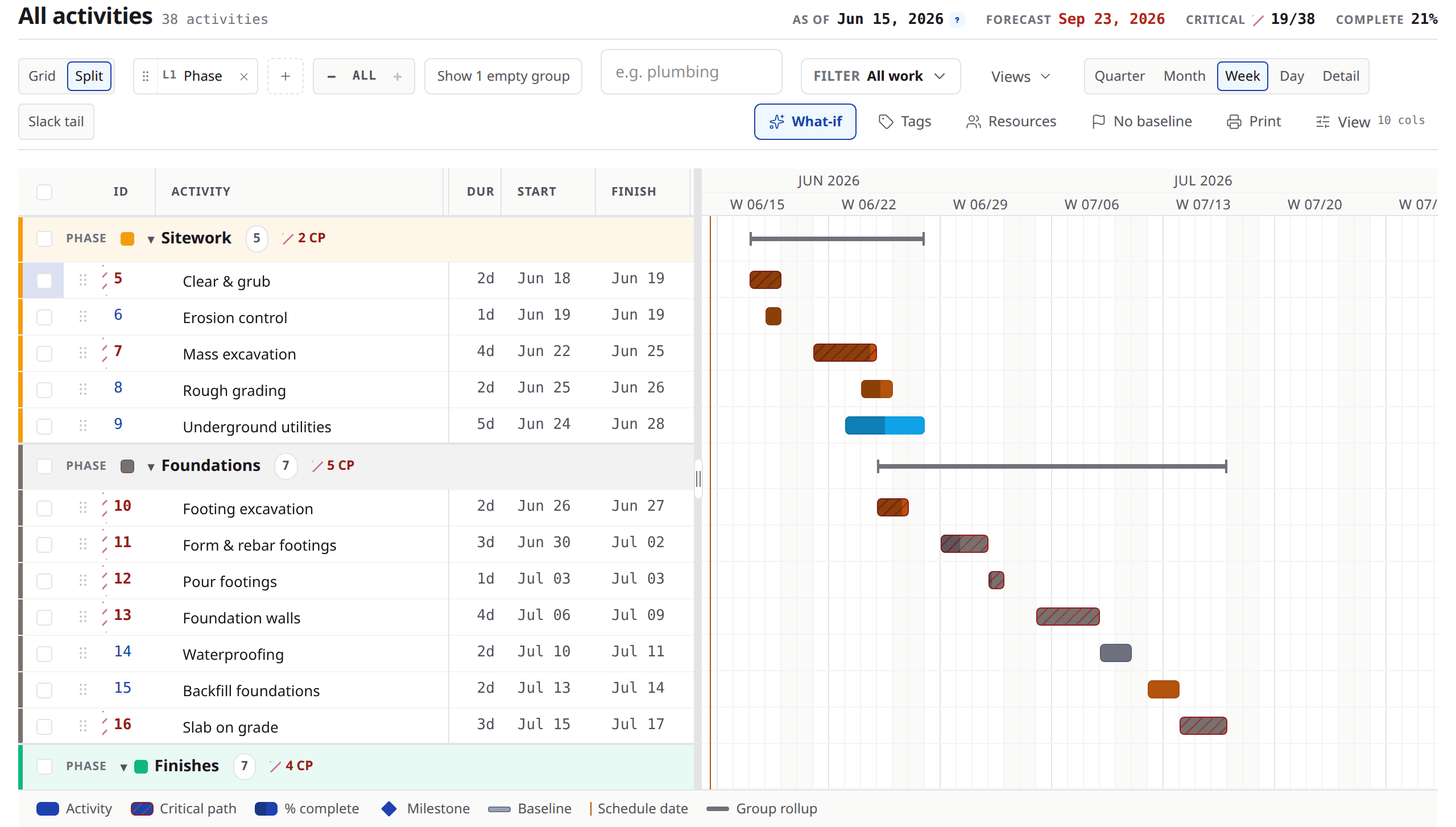
Look at
- 1The accented run of bars.
- 2The relationships drawn between them, which are the driving links.
- 3The rest drawn plainly.
“Driving” is about a link, not a row
An activity usually waits on several things. Normally just one is the reason it starts when it does — the relationship whose own dates, once its link type and lag are applied, land on that start. That relationship is the driving one, and Brikt marks it on the link. The others land earlier, and moving one inside its slack changes nothing.
Why it matters — “why does this start on the 14th” usually has one answer, and it is a specific relationship you can open and read rather than a colour on a row.
Two things that surprise people
A driving link can sit on an activity that is not critical: it explains that activity's own start without deciding the project finish. And when two predecessors land on exactly the same day, both are driving — Brikt does not pick a winner, because there is not one.
Why it matters — a tie is a real state of a schedule, and a tool that hid one of the two would send you to fix the wrong thing.
A pinned date takes work off the logic
Most dates should come from the sequence. Sometimes one is real anyway — a permit, a delivery, a milestone somebody signed. Brikt lets you pin those four ways, from the date cell, and a pinned date holds the activity to the calendar instead. Pin the ones that are genuinely fixed and let everything else be computed.
Why it matters — every pinned date is one fewer question the schedule can answer for you, so each one should be able to name the document it comes from. And while a pin holds a start that no predecessor reaches, nothing is driving that activity at all.
It moves, and that is the point
The chain is not a list somebody drew once. Report progress, change a duration, add a link, and the dates and the accent are recomputed with that same edit — not overnight and not on request. Work that was comfortable can join it; work that was on it can drop off once the crew makes up a week.
Why it matters — the useful question is not what was critical when the plan was drawn, it is what is critical this morning.
Ask about the chain, not about the colour
Ask
What is driving this activity's start?
Instead of
Why is this date wrong?
Ask
What is on the chain that decides the finish right now?
Instead of
Are we on track?
Ask
Which of these dates are pinned, and who pinned them?
Instead of
Can we pull this in?
What to remember
- You describe the work and the order; Brikt works out the dates you have not pinned, and the last one is the finish.
- Left alone, a slip on the work that decides the finish date moves the finish date with it. The rest have some slack — and mitigation or re-sequencing is how a slip gets absorbed instead.
- Driving is a property of a LINK — the relationship that decided when an activity starts.
- A driving link can sit on an activity that is not critical, and a tie makes both links driving.
- A pinned date holds an activity to the calendar, so pin only the dates that are genuinely fixed.
- It is recomputed with the edit that changes it, so the answer is about this morning.
Follow one chain back
Open a project you are running, turn on the Critical chip in the filter menu, and pick an activity near the end that has predecessors. Open them and follow whichever links Brikt marks as driving, then do the same again on whatever you land on. Keep going until the trail stops, and you are looking at the work that is holding the date. If a row has none marked, something other than a predecessor is setting its start — a pinned date, or the beginning of the project.
Carry on
Lesson 09 of 12