Learn · Field and check-in
The look-ahead: the next few weeks, in a form a crew will read
After this subject you can set a look-ahead window to the weeks your crews work to, group it the way they read it, and print a sheet that says what is coming and, once you are checking in, what is already behind.
A to-do list, not a logic diagram
A look-ahead is the near-term slice of the schedule — the work starting soon, pulled out as a plain list you can hand to a crew or a sub. A to-do list for the days just ahead, not a logic diagram. Nobody in the trailer wants the whole plan; they want their next two weeks.
Why it matters — it is not a second schedule you maintain. It is computed from the live plan every time you open it.
It starts where your schedule is speaking from
It starts at the date the schedule was last brought current, and counts forward from there — so the first day of the window is the day of your last check-in, not the day you happen to be looking. On a job with no check-in date yet it falls back to today, and says so.
Why it matters — if that date has fallen behind, the page says so on its face rather than quietly showing you a stale fortnight. Read next: what is a data date?
What it looks like open
The look-ahead is a tab on the project's Reports page. Each row carries the plain-language answer to when — behind and due last Friday, starts Monday, runs all week, runs past this window — beside a day strip that shows the activity's working days as whole days across the weeks in view.
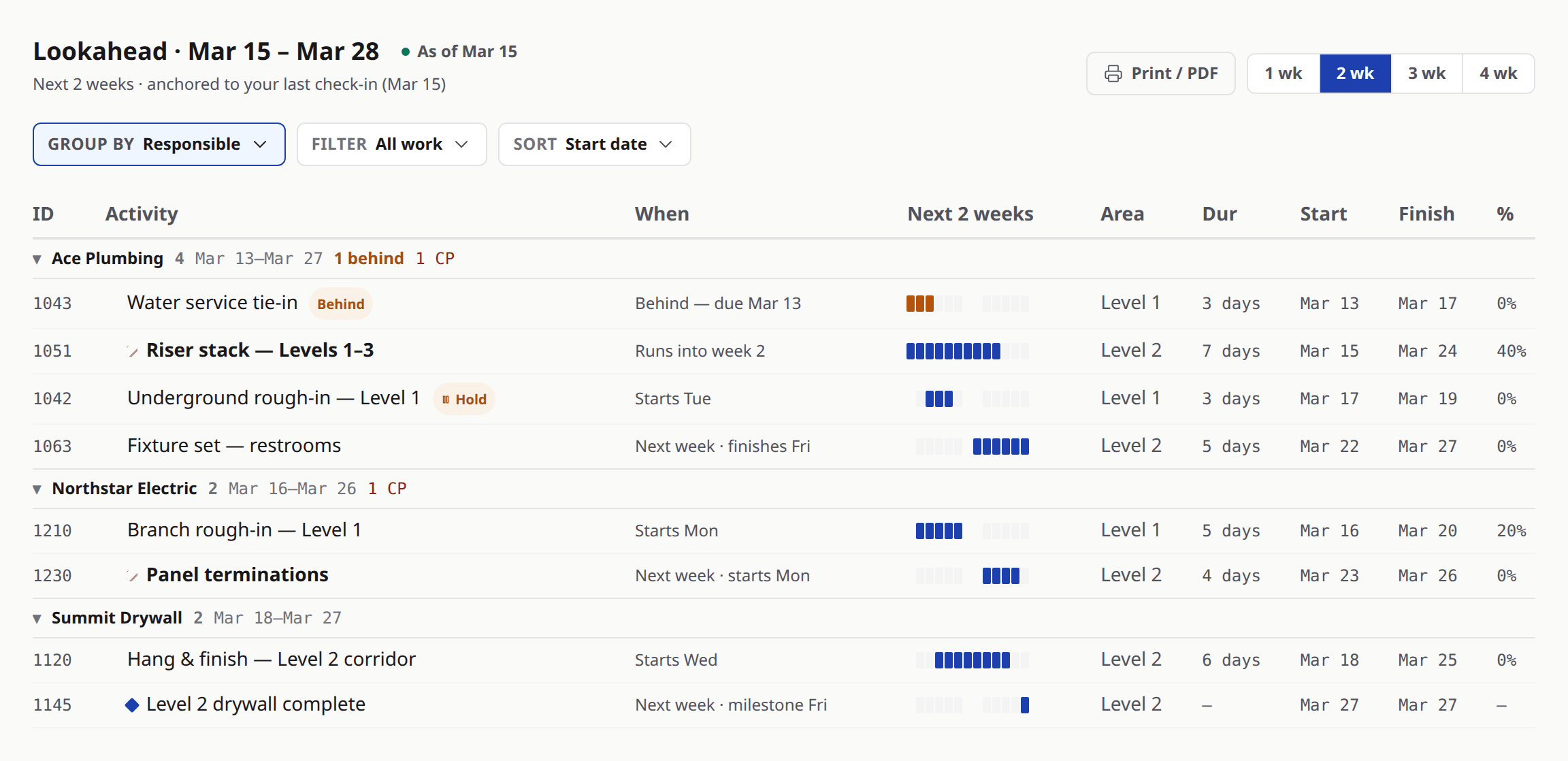
Look at
- 1The bands — one per responsible party, with a count and a date span.
- 2The When column, which says in words what the dates mean.
- 3The day strip, in whole days, with the weekend shaded.
Set the window to the weeks you work to
One, two, three or four weeks. Two is where it opens because that is the common field rhythm, but a job that pulls to three weeks sets three and stops translating. The choice is a single control, and it changes both the list and the day strip at once.
Why it matters — a window nobody has to convert is a window people read.
Group it the way your crews read it
Out of the box the work is grouped by who is responsible for it, which is how it gets handed out. You can stack up to three levels in the order you pick them — responsible, then week, then area — filter to a single sub, and sort inside the bands.
Why it matters — the whole arrangement lives in the page's address, so a signed-in teammate who opens that address gets the view you built rather than a blank one, and still reads it under their own visibility.
Behind is a rule, not an opinion
An activity is marked behind when the schedule expected it to have started by the as-of date and nothing has been recorded against it. That is the whole rule, and it is the same rule on screen and on paper. When there is no check-in date to measure from, the flag does not appear at all.
Why it matters — a flag that would have to guess is a flag that stays off, which is why keeping the check-in current is what makes this column worth anything.
The sheet for the trailer wall
Print or save it as a PDF and you get what is on screen — the same weeks, grouping, filters and sort — with a masthead, the date it is stated as of, and a short brief of what the period holds. You can start each sub on its own page for handing out.
Why it matters — those per-sub pages are an internal handout. The product says so on the option itself: they carry dates and progress, and they are never a sub's own restricted view.
Ask about the window, not about the plan
Ask
What is starting in your area in the next three weeks?
Instead of
Have you read the schedule?
Ask
These four are behind as of Monday — which ones move this week?
Instead of
Are we on track?
Ask
Here is your two-week sheet. Anything on it you cannot do?
Instead of
Let me know if there are any issues.
What to remember
- The look-ahead is the near-term slice of the live plan, not a second document you maintain.
- The window is one to four weeks and it starts at the date the schedule was last brought current, or at today on a job that has none yet.
- It groups by who is responsible by default, and you can stack up to three levels.
- Behind means the schedule expected a start by the as-of date and nothing was recorded — and it is off when there is no date to measure from.
- The printed sheet is what is on screen, and the per-sub pages are an internal handout.
Print next week's before the next foreman meeting
Open the look-ahead on a live job, set it to the weeks your foremen actually plan to, group it by who is responsible, and print it. Take that sheet to the next meeting instead of the full schedule. If you would rather build one on your own job with somebody alongside you, bring it to a demo.