Learn · The scheduling behind it
Days left, not percent complete: the number a forecast can use
After this subject you can say why Brikt asks the field for days left rather than a percentage, read the percent as the derived number it is, and answer a row in the units the schedule actually forecasts from.
Two honest answers, and Brikt asks for one of them
Ask how the slab is going and there are two true answers: a percentage, or the number of working days still to go. Only the second is already in the units a schedule works in — a percentage on its own does not name a number of days, and days are what a finish date is built from.
Why it matters — Brikt does not forecast from a percentage. It forecasts from the days left.
So that is the number Brikt asks for
You tell Brikt how much time is left, not a percentage. Brikt turns that into the percent you see — so the number always matches the days on the schedule.
10-day activity · 4 working days left → 60% complete · derived
Why it matters — a superintendent already knows the days left. It is the number they have been carrying around since Monday.
Which is why the percent cell will not take a number
Percent complete is a result, not an input, and the column is read-only everywhere it appears. That is not a restriction dressed up as a principle: a typed percentage and a reported days-left are two claims about one activity, so Brikt keeps one of them authored and derives the other from it.
Why it matters — this is the habit that takes about a week to break.
What that percent is a percent of
The column is called % Complete, and what it measures is duration percent complete — a percent of the planned time, not of the work in place. A slab with four of its ten planned days left reads 60%: a statement about the days left, not about how much of the slab is poured. It is a scheduling number, not one for a payment application.
Why it matters — it is a display convention derived from two numbers you already have. How much is physically in place is a separate measurement, and Brikt does not hold one.
What answering actually looks like
In the morning check-in, saying an activity started opens a strip that asks two things: the day it really started, and the working days left on it. Both arrive pre-filled from the plan, so agreeing with them is a tap rather than a form to fill in, and the strip says out loud that the days are counted from the schedule date rather than from today.
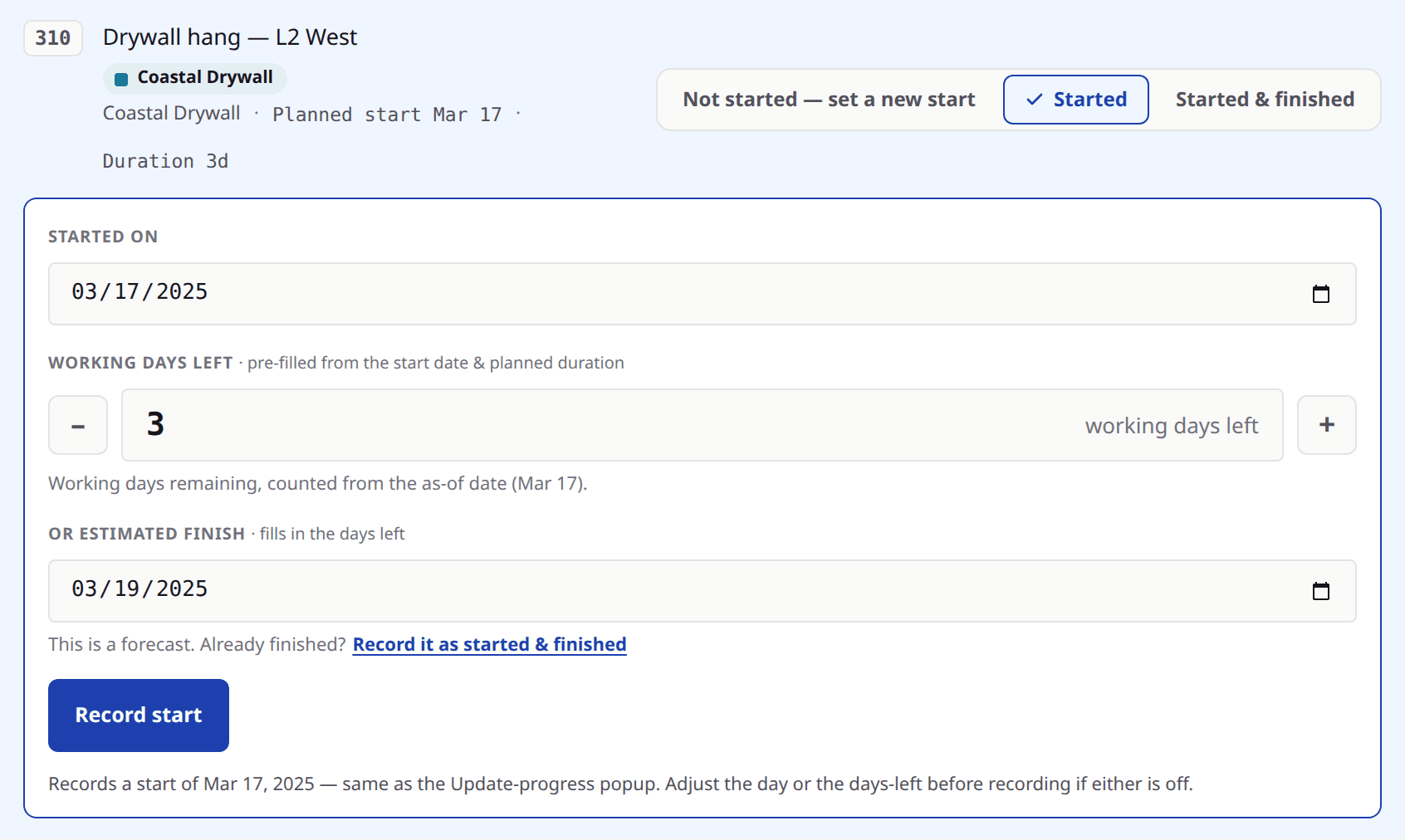
Look at
- 1The working-days-left field — the number the forecast is built from.
- 2Both answers pre-filled from the plan, so agreeing is the fast path.
- 3The line naming the date those days are counted from.
Whole days, and never zero
In Brikt, days left is counted in whole working days, and 1w means five duration days. Nothing starts or finishes in the middle of one. When the schedule date moves and a running activity is re-counted, the smallest honest answer is one day left — zero would mean finished, and finishing is something a person says.
Why it matters — only you finish an activity. Brikt never infers it from a number reaching the end. The whole-day count and the five-day week are both Brikt's conventions rather than facts about scheduling: other tools track durations in hours, and on a calendar that works six days a working week is six working days.
What the number then does
The days left re-date the rest of that activity from the schedule date, and the work waiting on it is worked out again in the same edit. So one honest answer in the morning re-forecasts everything that depends on it — which is the return on asking for the number the field already has.
Why it matters — percent complete still exists and is still what you show an owner. It is derived from days left, in that direction and not the other.
What to remember
- A percentage on its own does not name a number of days; days left is the number Brikt asks for.
- You tell Brikt how much time is left, not a percentage, and the percent you see is derived from it — duration percent complete, a percent of the planned time rather than of the work in place.
- The percent column is read-only everywhere, because Brikt keeps days left as the authored number and derives the rest.
- Re-counted onto a new schedule date, days left lands on a whole day and floors at one — zero would mean finished.
- Only a person finishes an activity; Brikt never infers a completion.
- One answer re-dates that activity, and the work waiting on it is worked out again.
Answer one row with days, not a percentage
Open a project you are running, start the morning check-in, and answer one activity that is genuinely underway. Say the day it started and the working days left, then read what the schedule now forecasts for the work behind it. That is the whole argument, on your own job. If you would rather see a full morning on a real schedule first, bring one to a demo and we will run it together.