Learn · Field and check-in
Blockers: the record you will want in three months
After this subject you can raise a blocker from the check-in against the schedule date you were shown, work it in the open, and clear it with a note that survives the job.
What a blocker is, and what it is not
A blocker is an obstacle in the way of an activity — a missing material, an unanswered question, another crew not finished. While it is there the work cannot move, and everyone can see exactly why. It never moves a date on its own: the scheduling engine does not read it.
Why it matters — a hold keeps a date; a blocker names what is in the way. Two different things, easy to mix up.
Raise it where the lateness is realised
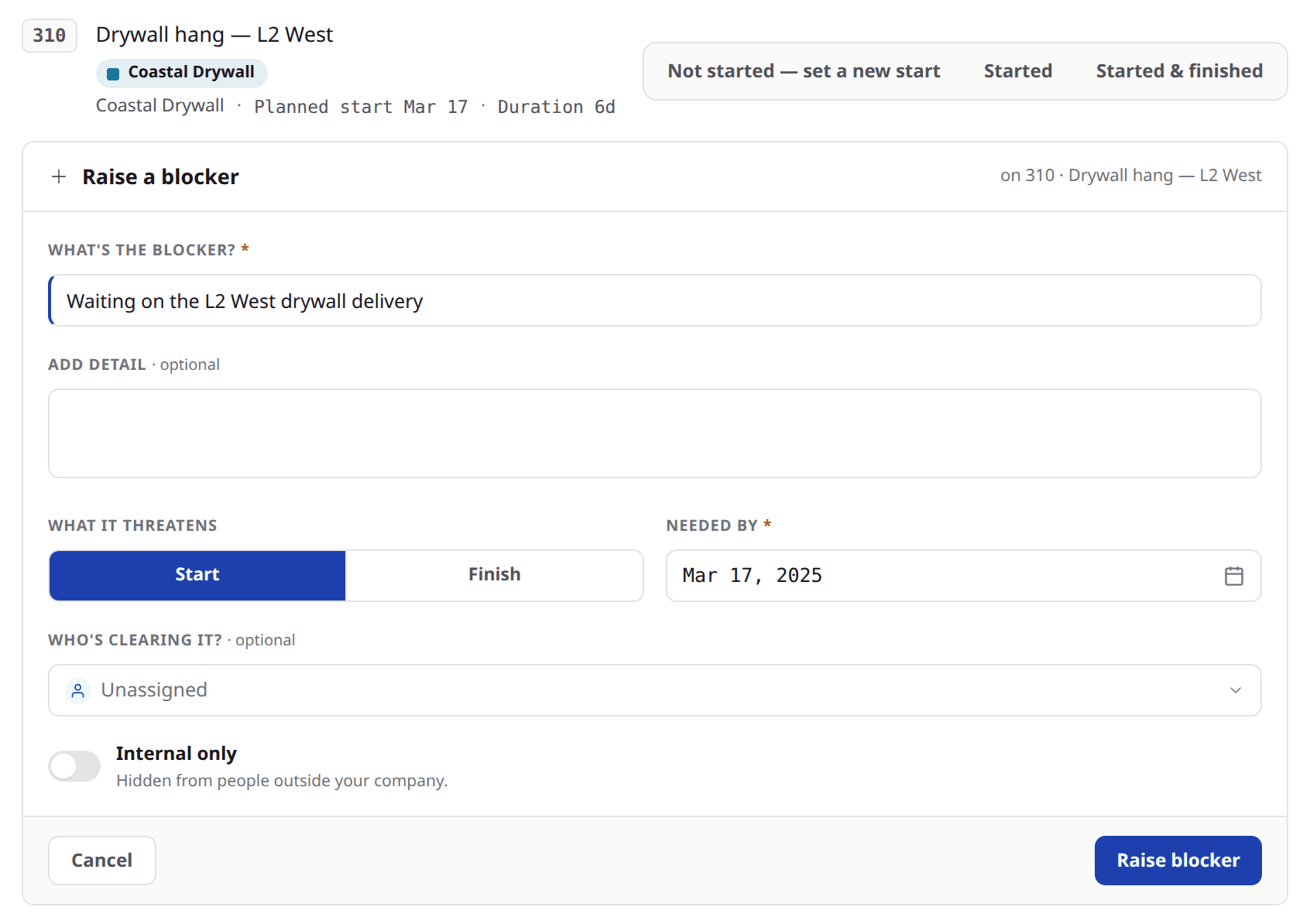
The moment worth writing it down is the moment you find out. So the raise sits on the check-in row that just told you the work did not start, and on the activity itself. Two answers are required — what the blocker is, and when it is needed by. What it threatens comes pre-filled, and so does who is clearing it wherever the activity's responsible tag unambiguously matches a project member.
Look at
- 1The row it opens on — the one that just said the work did not start.
- 2The two starred answers: what the blocker is, and when it is needed by.
- 3Internal only, for a blocker your own company should keep to itself.
Why it matters — there is no category list to choose from. The sentence you would say out loud is the record.
Validated, not trusted
A blocker raised from the check-in records the schedule date you were shown. Before it saves, Brikt re-reads that date and refuses the raise if it has moved — the schedule date moved while this blocker was being written, nothing was saved. The dates refresh and you raise it again.
Why it matters — a record anchored to a date nobody was measuring from is worse than no record. Raised from the activity instead, a blocker claims no anchor at all.
Two questions the queue answers
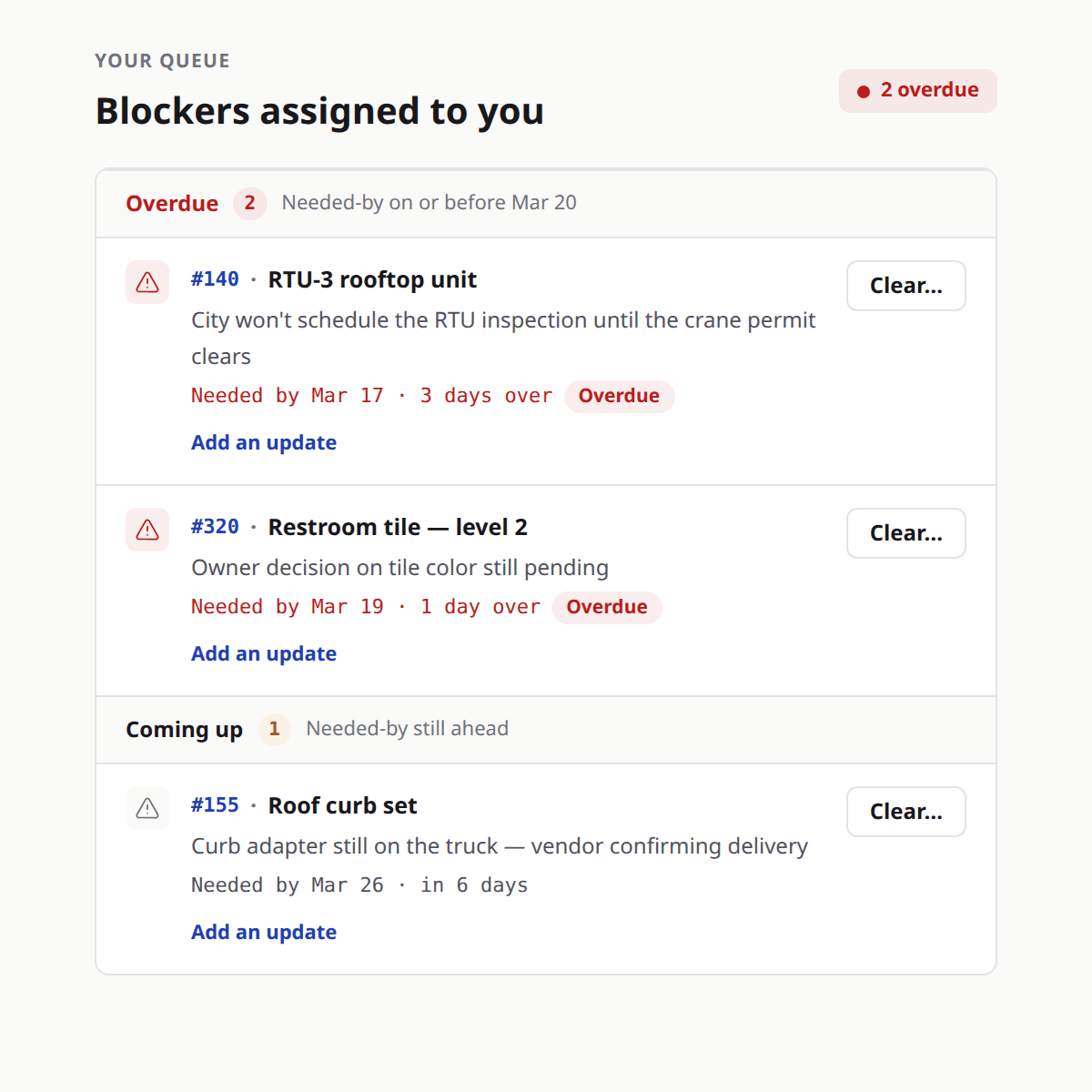
What is waiting on me, and what is waiting on anyone. Rows sit in two bands — overdue, then coming up — soonest needed-by first, each naming the activity it threatens, the date it is needed by, and either how far past that date it has run or how long is left before it.
Look at
- 1The two bands — overdue first, then coming up.
- 2The activity each blocker threatens.
- 3How far past its needed-by date an overdue row has run.
Why it matters — a blocker reaches the queue of whoever is clearing it, and stays there until somebody says how it was cleared.
Working it, and clearing it
An update reports where a blocker stands without clearing it, and the updates stay on the record in order. Clearing asks how it was cleared, and that note is required — the blocker stays on the record as cleared, with your sentence attached. Raised in error is a separate answer, and it withdraws rather than deletes.
Why it matters — nothing here is ever removed. In three months the argument is about what was known when, and this is the answer.
Ask what it is waiting on
Ask
What is standing in the way, exactly?
Instead of
Why is this late?
Ask
Who is clearing this, and by when do we need it?
Instead of
Can somebody chase this?
Ask
What did we do about it, and on what day?
Instead of
Is that one sorted?
What to remember
- A blocker names the obstacle. A hold keeps a date; a blocker says what is in the way.
- It never moves a date on its own, and the scheduling engine never reads it.
- Raise it where the lateness is realised — from the check-in, against the schedule date you were shown.
- Two answers are required: what it is, and when it is needed by.
- Updates report progress without clearing it; clearing takes a note; withdrawing leaves the record standing.
Write the next one down where you find it
The next time a check-in tells you something did not start, raise the blocker from that row rather than carrying it to the meeting. Name what the work is waiting on and the day you need it by, and let the queue hold it. If you would rather see the whole loop on a job of your own, bring one to a demo.