Learn · Schedule grid and Gantt
Switching from P6 or Microsoft Project: what maps, and what changes
After this subject you can map the core scheduling habits this subject covers onto their Brikt equivalents, and find the few that work differently on purpose or have no equivalent at all.
Most of what you know still applies
Four relationship types with lag. Working calendars. Total and free float. Baselines and variance. Pinned dates. A forward and backward pass that computes the dates you have not pinned. If you run schedules for a living, the model underneath is the one you already have in your head.
Why it matters — what changes is not the scheduling. It is who is expected to operate it.
No multi-level tree, and no computed summary dates
The biggest change first. There is no multi-level tree to commit to and no summary row whose dates are computed from the rows beneath it: area, trade, phase and who is responsible are dimensions you group by, stack two deep and reorder. The same activities answer a different question without a date moving.
Why it matters — where a genuine containment exists, one level of sub-activities holds detail inside a parent's committed window. The parent's dates never stretch from its children.
What you land in
The grid and the bar chart side by side, grouped, with the columns you choose and the chain that is driving the finish accented. No saved layout comes across, but the habit does: you save a lens here the way you saved one there, and it takes a scope P6 layouts have no equivalent of — yours alone, shared with the project, or published to the company library for every job to start from.
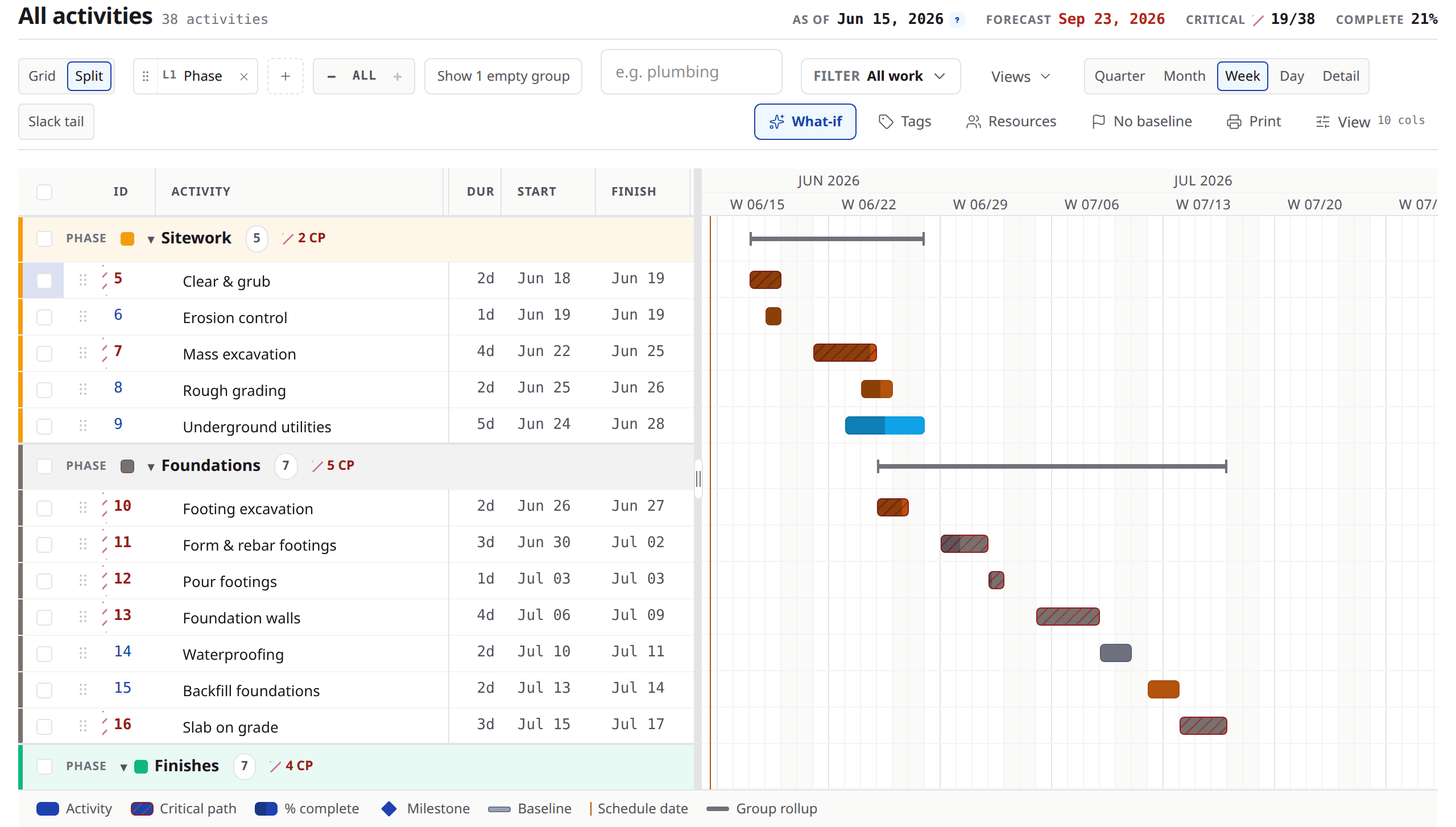
Look at
- 1The grouping bands, stacked from the dimensions you chose.
- 2The columns — a set you pick, not a fixed table.
- 3The accented chain on the chart, and the timeline scale above it.
The chart is for reading
Every date you pin, every duration and every relationship is set in the grid — typed in a cell, or picked in the link editor. The chart draws the result and does not accept edits, which is a decision rather than a gap: the grid is the surface a keyboard and a screen reader can both operate.
Why it matters — the fastest way to move a date is still the keyboard, and it leaves a record of what you did. A schedule edited by pointing is a schedule nobody can audit.
Percent is a result, not an input
You tell Brikt how much time is left, not a percentage. Brikt turns that into the percent you see, so the number always matches the days on the schedule. The percent column cannot be typed into, and a superintendent answering a daily check-in is the person the model expects to author that number.
Why it matters — this is the habit that takes a week to break and then never comes back. Days left points forward; a percentage summarises the past.
Float, baselines, and what the chart shows
Total float and free float are columns. Criticality is a column and an accent on the bar. The relationship that is driving each successor is drawn differently from the ones with slack. Baselines capture, name and sign off, and the saved plan draws as a second lane under the live bar with the slip marked.
Why it matters — one baseline is active at a time. If your practice is comparing several at once, that is a real difference and it is worth knowing before you move.
Constraints, calendars, and crews
Four constraint types are yours to set, from the date cell: start no earlier than, must start on, finish no later than, must finish on. Calendars go further than you might expect — the project runs one, and a night-shift or Saturday crew gets its own on its own activities.
Why it matters — resources here are coordination, not arithmetic. You name the crew and say who is on the work, and assigning somebody never moves a date, because the assignment path does not reach the scheduling engine at all.
Nobody checks the schedule out
Two people work the same job at the same time. You see where your teammates are, and the grid refreshes as they commit. Edit different cells and both land. Edit the same field and the second person is told so — with what they typed still on screen rather than silently discarded.
Why it matters — no exclusive checkout, no merge session on a Friday, and no version of the schedule sitting on somebody's laptop.
The file question, in the words we hold ourselves to
Every evaluation reaches this question, so here it is answered once.
Brikt does not import Primavera P6, XER, Procore or Autodesk files. A Microsoft Project schedule comes in through a guided conversation and lands as a draft you review.
Brikt has no integration, connector or sync with Primavera P6, Procore, Autodesk, Microsoft Project or any other project system.
And the one road that is open
There is a way across, and it is narrow and honest about itself.
A Microsoft Project schedule comes in as an MSPDI file through a guided conversation and lands as a draft you review. It is not a connector and not a sync, and nothing is written to your schedule without your review.
Why it matters — if your current tool can export to that format, that is the road. The draft you get tells you what it skipped, by category and count.
What to remember
- The scheduling model is the one you know: four relationship types, lag, calendars, float, baselines, pinned dates.
- Structure is a lens you group by rather than a multi-level tree you commit to in week one.
- The grid is the editing surface and the chart is the reading surface.
- Days remaining is the input and the percent is the result, in that direction only.
- The boundary is stated on this page in the reviewed words themselves, and the honest road in is an exported XML schedule that lands as a draft.
Rebuild one week of a job you know
Take a fortnight of a job you have already scheduled and build it again here from scratch — the work, the order, the durations. It is the fastest way to find out which of your habits transfer and which of them do not. If you would rather bring the real file and have somebody walk it with you, do that at a demo.