Learn · AI-assisted planning
Proposals: Claude drafts, and you decide
After this subject you can ask Claude for a change, read what it would do to your schedule, and apply it or send it back — knowing exactly where the line between drafting and deciding sits.
One line that never moves
Claude can draft changes to your schedule and answer questions about the work, but it never changes the live schedule on its own. A person always reviews what Claude drafts and decides whether to apply it. Claude drafts; a person applies.
Why it matters — that line is not a setting anybody can turn off. The software has no route that would let it.
Where you ask
Claude sits in a panel beside the schedule you are already looking at, reading the same project you are. Open it from the rail or with the keyboard, and ask in plain words: why did the finish move, what is driving it, what happens if the steel slips two weeks.
Why it matters — you can watch the tools it is using as it works, so an answer is never a black box.
Nothing reaches review by accident
A conversation is a conversation until you say otherwise. When a draft is worth acting on you send it to review, and that is the moment it becomes a proposal with your name on it as the person who put it forward.
Why it matters — the change that lands in the queue is the one the server drafted, not one assembled on the way there.
What is waiting for you
A proposal opens with what it would change and why: the activities it touches, each with its value before and after, and one summary card that measures the change in whatever terms that change is in. The verbs sit together at the bottom — apply it, send it back for a redraft, or dismiss it.
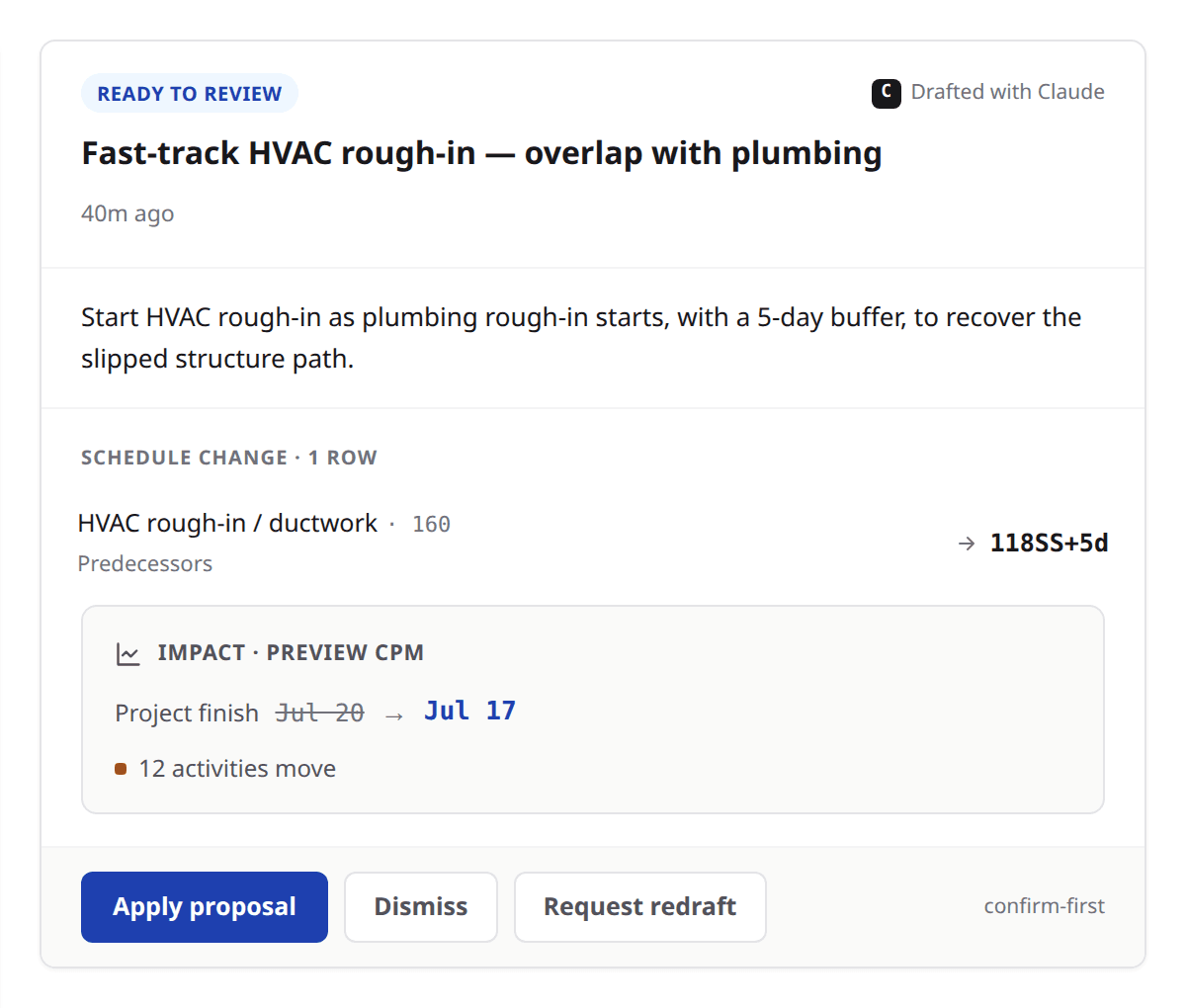
Look at
- 1The change itself, before and after.
- 2The impact summary — the finish date and how many activities move.
- 3Apply, request a redraft, or dismiss.
The summary card fits the change
A schedule change gets an impact card: a fresh run of the engine at the moment you are reading, reporting where the project finish lands and how many activities move. A change to somebody's role on the project gets a different card, which lists in plain words what they gain and lose the ability to do.
Why it matters — a role change moves no dates, so a schedule impact card would have nothing honest to say about it.
When the schedule has moved underneath it
Schedules do not hold still while a proposal waits. If yours moved since the draft was written, the proposal says so, names how many rows changed, and turns apply off rather than letting you commit against a plan nobody is looking at any more.
Why it matters — you can ask Claude to freshen it against today's schedule instead, which drafts a replacement rather than editing the old one.
Send it back without losing it
A proposal that is close but not right goes back for a redraft. Apply comes off that version straight away and the record of the request stays, so a proposal already sent back cannot be quietly applied by the next person who opens it. Dismiss is always there as the plain no.
What applying actually does
Applying asks you to confirm, then commits every change at once or none of them. It goes through the same code a person typing in the grid goes through, so the engine runs, the dates settle, and the result is one grouped event in the record rather than a scatter of edits.
Why it matters — the confirm step says it in the product's own words: applied as you, atomically, recorded as one grouped event.
Whose name is on it
The proposal card reads drafted with Claude, and the project's own log of what changed reads your name with Claude beside it. Claude is credited where it worked and is never the actor: the person who applied it is who the record names, because that is who decided.
Why it matters — three months later the question is who approved this, and the answer is a person.
Ask for a draft, not for a decision
Ask
Draft me the change that pulls the roof dry-in back two weeks.
Instead of
Fix the roof dry-in.
Ask
What does this proposal do to the project finish?
Instead of
Is this proposal safe to apply?
Ask
Redraft this against today's schedule.
Instead of
Apply it anyway, it is probably still fine.
What to remember
- Claude drafts; a person applies. Every real change goes through a human.
- A conversation becomes a proposal only when you send it to review.
- The summary card fits the change: schedule impact for dates, capabilities for a role.
- A proposal whose schedule moved underneath it turns apply off rather than committing blind.
- Applying commits all of it or none of it, through the same code a manual edit uses, and the record names the person.
Ask for one change you already know you need
Open a project you know well, ask Claude for one change you were going to make by hand, and read the impact card before you decide anything. Send it back once, just to see what that does. If you would rather watch somebody do it on a real job first, bring one to a demo.