Learn · Schedule grid and Gantt
Bring your existing schedule in, without retyping it
After this subject you can export a schedule from MS Project, bring it through the guided conversation, and read the draft it lands as before a single row reaches your project.
Start from the file you already have
Nobody wants to rebuild a schedule they already own. In MS Project, use File then Save As, choose XML Format, and save. That is the file Brikt reads — not the ordinary project file you save every day, which is a format we cannot open and which says so plainly instead of half-working.
Why it matters — the export is three clicks in MS Project itself, and needs no add-in and no plugin.
Three doors, one conversation
There is no separate import screen and no column-mapping step. Project settings carries an Import a schedule card, an empty schedule offers the same from the grid, and the Claude panel lists it first among the things you can ask for. All three open the same conversation, and the composer underneath it is where the exported file goes.
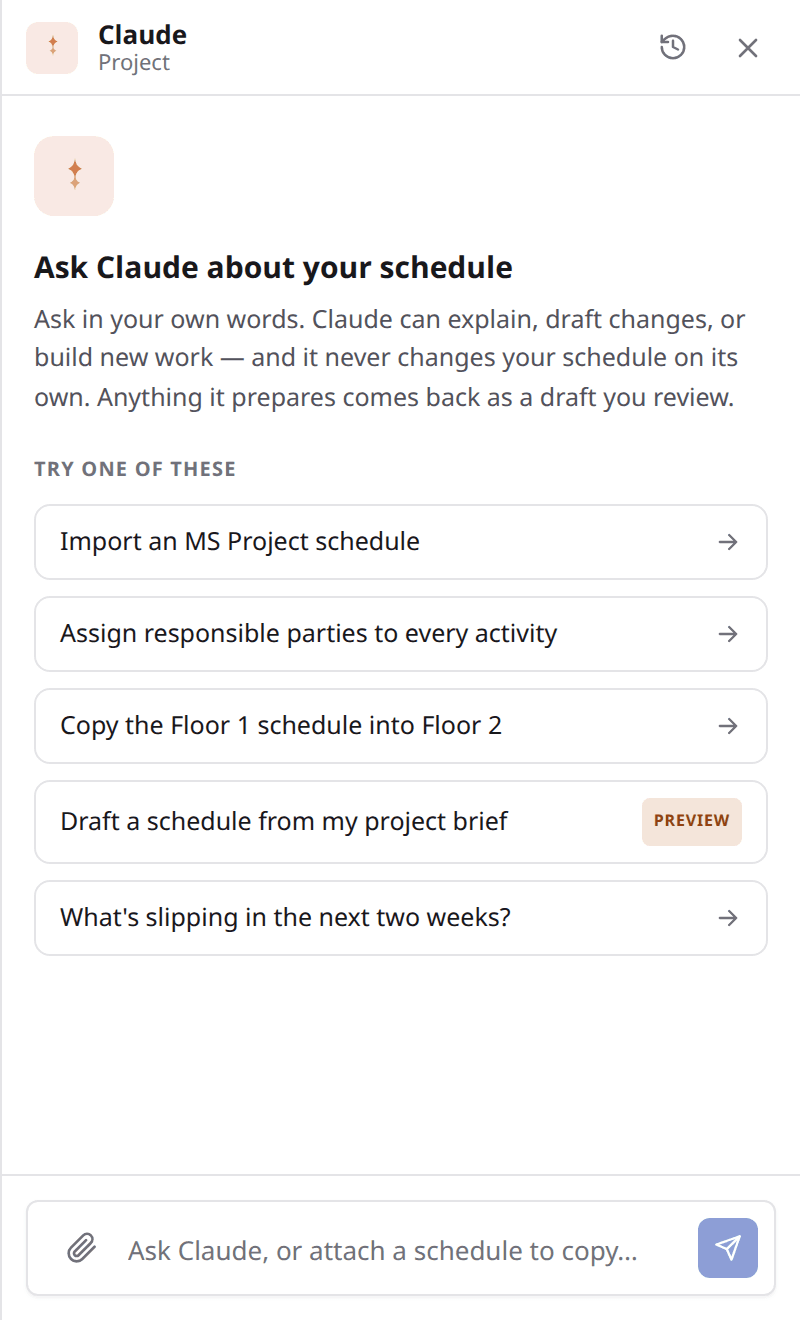
Look at
- 1The import door, first in the list of things the panel offers.
- 2The composer beneath it, where the exported file is attached.
- 3Pictured before anything is attached — the invitation, not the conversation.
Claude reads it before it asks you anything
Attach the file in the Claude panel and the server reads it first. What comes back is what your file actually holds — how many real activities, what the section headings are, who the resources are, whether there is progress in it — so the conversation starts from your schedule rather than from a form.
Why it matters — you find out what is in the file before you decide anything about it.
A few questions, already answered
Then two to four short questions, each with a sensible answer already filled in and a line saying why, so you can mostly just say yes. Group it by your own section headings. Bring the resource names in as who is responsible. Take the whole file or one section. Anything the file already settles is not asked.
It lands as a draft you review
Here is the whole shape of it, in the words we hold ourselves to.
A Microsoft Project schedule comes in as an MSPDI file through a guided conversation and lands as a draft you review. It is not a connector and not a sync, and nothing is written to your schedule without your review.
Why it matters — you open it in your queue, read what it would create, and apply it. Or send it back and say what was wrong.
What comes across, and what is left behind
Activities, durations in whole working days, all four link types with their lag, pinned dates of the kinds Brikt models, and resource names as who is responsible. Working calendars and resource hours are out of scope and do not come across at all.
What the draft counts back is every row and link it skipped, by category and count.
Why it matters — the categories are named: the summary rows, the ones carrying no name, the links that pointed outside what you imported. You are told what did not make it and how much of it, before you apply anything.
Progress arrives as its own second draft
If the file carries actuals, they are read and held rather than mixed into the first draft. Apply the schedule, then ask for the progress and it arrives as its own proposal to review. Two decisions instead of one, because bringing in a plan and stating where the work stands are different acts.
Why it matters — rows marked finished with no actual finish date are skipped rather than invented, and the draft says how many.
What to remember
- Export from MS Project with File, Save As, XML Format — that is the file Brikt reads.
- The server reads it first, then Claude asks at most a handful of questions that are already answered.
- The result is a proposal in your review queue, never a write to your live schedule.
- Summary rows, working calendars and resource hours do not come across at all.
- The rows and links the importer did skip are reported back by category and count.
- Progress is a second draft you ask for after applying the first.
Bring one real job in
Take a job you already have in MS Project, export the XML, and walk it through the conversation once. Read the draft before you apply anything — that is the whole point of it landing there. If you would rather have somebody alongside you the first time, bring the file to a demo and we will do it together.