Learn · Schedule grid and Gantt
Build a schedule: the work, the order, and the dates that follow
After this subject you can build a linked, calendared schedule from a blank project — adding the work, saying what has to happen first, and letting the dates compute rather than typing them.
You are building two things, and only one of them is dates
A schedule is the work, and the order the work has to happen in. Give it those two and the dates are arithmetic — they fall out of the logic and the calendar. Most schedules go wrong because somebody typed the dates first and the order never got written down at all.
Why it matters — a schedule whose dates were typed cannot tell you what happens when something slips, because nothing in it knows what depends on what.
Add the work first
A new project opens with the grid and the chart side by side, and the work is added in the grid itself — a row at the end of each band, an insert line between rows, or the keyboard. Type a name and press return, and it arms the next row, so a list goes in as fast as you can say it.
Why it matters — a name is the only thing a new activity needs. Leave the duration blank and it takes one working day of the project's own calendar until you say otherwise.
The grid and the chart are one surface
The grid is where the schedule is written and the chart is where it is read, and they are the same rows. Group them by phase or area, add the columns you want, and the chart follows — with the chain that is driving the finish accented so it is visible without hunting for it.
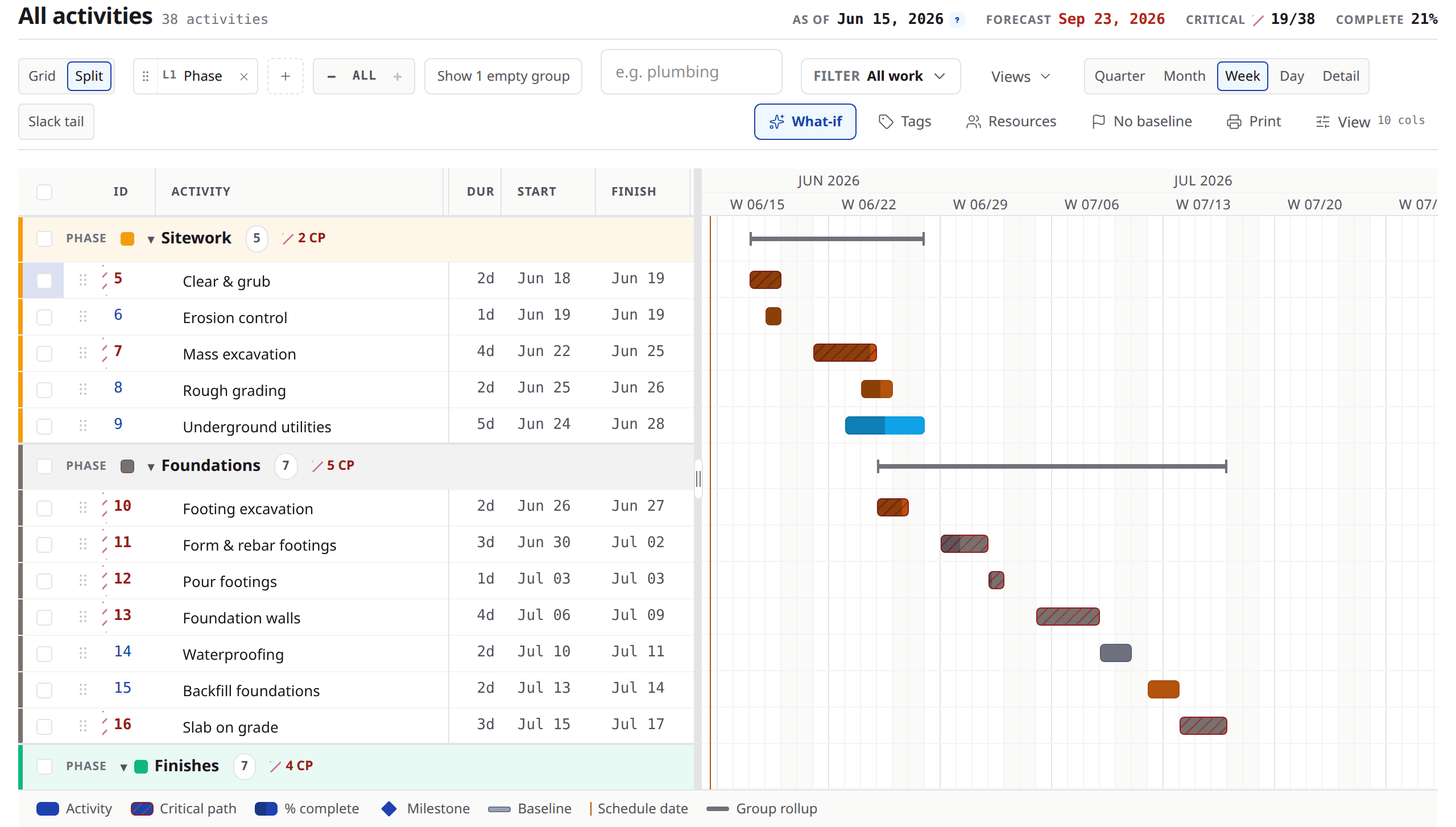
Look at
- 1The columns — ID, activity, duration, start, finish, then what comes first.
- 2The phase bands, and the same rows drawn as bars beside them.
- 3The accented chain — the run of work that is driving the finish date.
Working duration is whole days
Duration in working days: the amount of time an activity takes when crews are on it. Whole days, because a schedule that says two and a half days is describing a crew that does not exist. Where you genuinely mean elapsed time — concrete curing through a weekend — there is a separate way to say it.
Why it matters — the days are counted against a calendar, so a five-day activity crossing a holiday finishes a day later without anybody adjusting anything.
Say what has to happen first
The predecessor column takes a shorthand a scheduler can type without leaving the keyboard: an activity ID, one of the four link types — FS, SS, FF, SF — and a signed offset in working days.
230FS+2d
Reads as: start two working days after activity 230 finishes. Separate several with commas. Leave the type off and it means finish-to-start.
Why it matters — you can also click the cell and pick from a list, set the type with four buttons and type the offset, if you would rather not remember the grammar.
Then stop typing dates
With the work and the order in, the start and finish columns compute themselves and keep computing. That is why the chart is for reading rather than editing: every input — a duration, a link, a date you pin — is set in the grid, which is also the only surface a keyboard and a screen reader can reach.
Why it matters — when something moves, everything downstream of it moves too, in the same breath, because nothing was pinned by hand.
Pin a date only when it is real
Sometimes a date is a fact — a permit, a delivery, a shutdown window. Edit the start or finish cell and you pin one, and the schedule recalculates around it instead of arguing with it. The cell wears a marker afterwards so nobody wonders later why that row will not move.
Why it matters — pinning a date you merely want is how a schedule stops being able to tell you the truth. The health panel counts them and tells you when there are too many.
The calendar underneath
One working calendar carries the project: the working week, the holidays, the shutdowns. A crew that works Saturdays or a night shift gets its own calendar on its own activities. Every date on the project honours it, so the arithmetic is done against the days you actually work.
Why it matters — switching a project's calendar is a confirmed act, because the dates you already recorded are re-derived onto the new working week and the schedule recomputes.
It edits like a spreadsheet, on purpose
Arrow keys move, return and F2 open a cell, typing replaces it. Copy and paste a block from Excel. Fill a value down a column or across a row. Undo with the usual chord. None of this is a novelty — it is the difference between a scheduler building a job in an afternoon and building it over three days.
Ask about the order, not the date
Ask
What has to be finished before the slab pour can start?
Instead of
When can the slab pour start?
Ask
Is that a real pinned date, or is it just where it landed?
Instead of
Can we move that date?
Ask
How many working days is that with your crew on it?
Instead of
How long does that take?
What to remember
- Build the work and the order. The dates are the arithmetic that follows.
- A new activity needs a name; a blank duration is one working day of the project's calendar.
- Working duration is in whole working days, counted against whichever calendar that activity runs on — with elapsed time said a separate way.
- The shorthand is an activity ID, optionally a link type and a signed offset in working days, comma separated.
- Pin a date only when it is a real commitment, and the health panel will tell you when there are too many.
Build ten rows and link them
Open a blank project and put in the first ten activities of a job you know, durations only. Then go down the predecessor column and say what comes first. Watch the dates arrive on their own, and move one duration to see what follows it. If you would rather do that on a real job with somebody alongside you, bring one to a demo.